Introduction
Whenever someone receives a job offer, the first salary-related term they usually notice is CTC (Cost to Company). Many job seekers assume that the CTC mentioned in the offer letter is the exact amount they will receive every month. However, after joining the company and receiving their first salary, they often realize that the amount credited to their bank account is lower than expected.
The reason for this difference is that your monthly In-Hand Salary, also known as Take-Home Salary or Net Salary, is calculated after deducting various contributions and taxes such as EPF, Professional Tax, Income Tax (TDS), and other applicable deductions.
Understanding how your in-hand salary is calculated is important for managing your monthly budget, comparing job offers, planning investments, and making better financial decisions.
In this comprehensive guide, you’ll learn what in-hand salary is, how it differs from CTC and gross salary, the formula used to calculate it, real-life examples, common deductions, and practical tips to maximize your take-home pay.
What Is In-Hand Salary?
In-Hand Salary is the actual amount of money that an employee receives in their bank account after all mandatory deductions have been made from the monthly salary.
It is commonly referred to as:
- Take-Home Salary
- Net Salary
- Monthly Pay After Deductions
Unlike the CTC mentioned in your offer letter, the in-hand salary reflects the real amount available for your monthly expenses and savings.
The following deductions may reduce your monthly in-hand salary:
- Employees’ Provident Fund (EPF)
- Income Tax (TDS)
- Professional Tax
- Employee State Insurance (ESIC), if applicable
- National Pension System (NPS), if applicable
- Company-specific deductions
- Loan or salary advance deductions (if applicable)
What Is CTC (Cost to Company)?
CTC (Cost to Company) represents the total annual cost that an employer spends on an employee. It includes not only the employee’s salary but also several benefits and employer contributions.
A typical CTC package may include:
- Basic Salary
- House Rent Allowance (HRA)
- Dearness Allowance (DA)
- Special Allowance
- Performance Bonus
- Employer’s EPF Contribution
- Gratuity
- Medical Insurance
- Food Coupons
- Other Employee Benefits
Since many of these components are not directly credited to your bank account every month, your CTC is always higher than your in-hand salary.
What Is Gross Salary?
Gross Salary is the total salary earned by an employee before taxes and statutory deductions are deducted.
Gross Salary generally includes:
- Basic Salary
- House Rent Allowance (HRA)
- Special Allowance
- Travel Allowance
- Medical Allowance
- Performance Incentives
- Other Salary Components
Formula
Gross Salary = Basic Salary + All Allowances + Bonuses
Gross salary does not represent the amount you actually receive because deductions are applied afterward.
What Is Net Salary?
Net Salary, also known as Take-Home Salary or In-Hand Salary, is the amount that is finally credited to your bank account every month.
Formula
Net Salary = Gross Salary − Total Deductions
The total deductions may include:
- EPF
- Income Tax (TDS)
- Professional Tax
- ESIC
- NPS
- Other Company Deductions
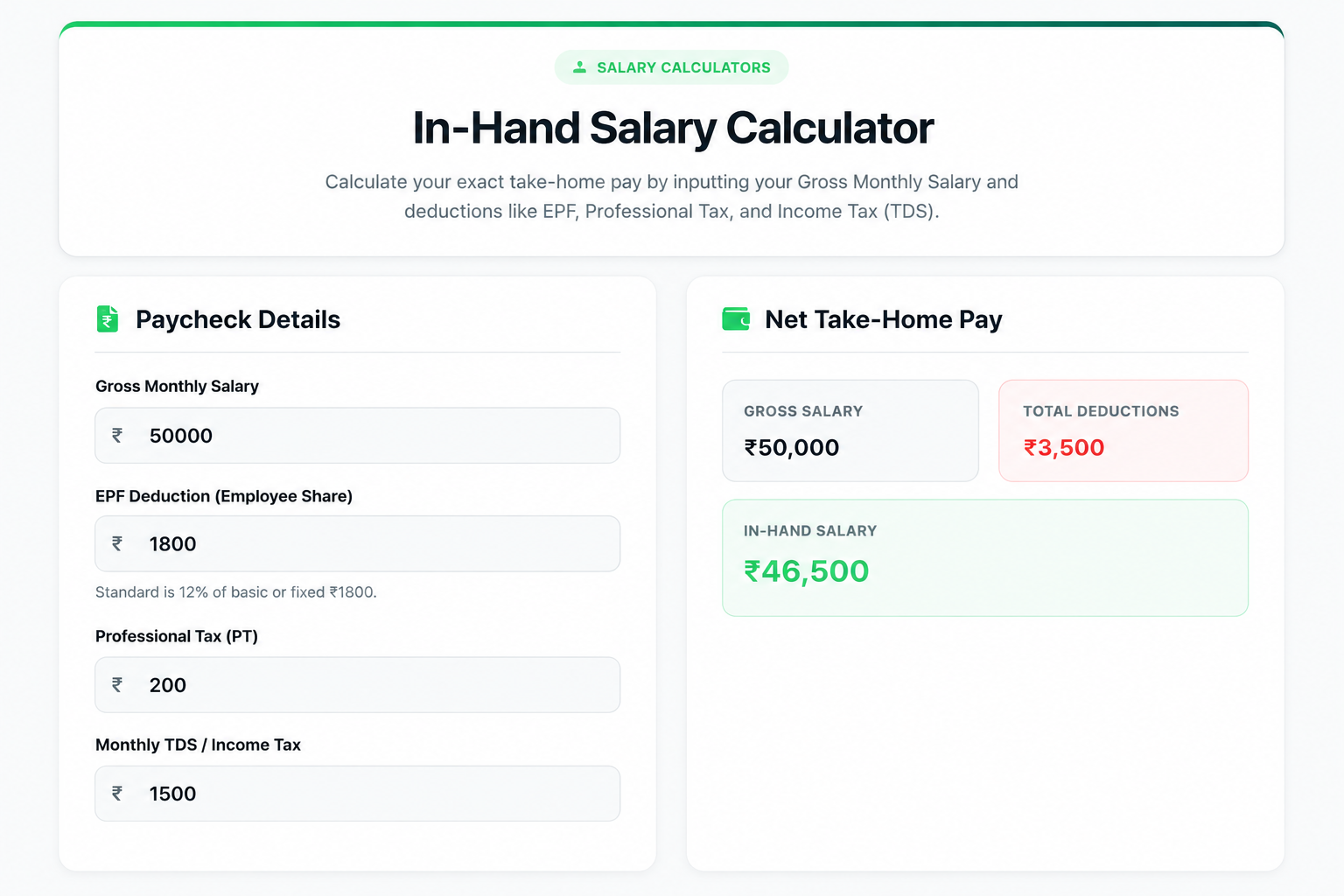
How to Use the In-Hand Salary Calculator on Toolzeniq.com
Calculating your take-home salary is quick and easy with the Toolzeniq.com In-Hand Salary Calculator. Simply enter your salary details, and the calculator will instantly estimate your monthly in-hand salary after deducting applicable taxes and contributions.
Follow the steps below:
Step 1: Enter Your Gross Monthly Salary
In the Gross Monthly Salary field, enter your total monthly salary before any deductions.

For example:
₹50,000
This amount should include your gross monthly earnings before EPF, tax, or other deductions are applied.
Step 2: Enter EPF Deduction (Employee Share)
In the EPF Deduction field, enter your monthly Employee Provident Fund (EPF) contribution.
Example:
₹1,800
If you already know your monthly EPF deduction from your salary slip, simply enter that amount.
Step 3: Enter Professional Tax (PT)
Now enter the monthly Professional Tax deducted by your employer.
Example:
₹200
If Professional Tax is not applicable in your state or company, you can enter ₹0.
Step 4: Enter Monthly Income Tax (TDS)
In the Monthly TDS / Income Tax field, enter the amount deducted as Income Tax every month.
Example:
₹1,500
If no tax is deducted from your salary, simply enter ₹0.
Step 5: View Your Salary Summary
Once all the required values are entered, the calculator automatically displays:
- Gross Salary
- Total Deductions
- Estimated In-Hand Salary
There is no need to perform manual calculations. Results are updated instantly as you change any value.
Example Calculation
Suppose your monthly salary details are:
| Salary Details | Amount |
|---|---|
| Gross Monthly Salary | ₹50,000 |
| EPF Deduction | ₹1,800 |
| Professional Tax | ₹200 |
| Income Tax (TDS) | ₹1,500 |
Total Deductions
₹1,800 + ₹200 + ₹1,500 = ₹3,500
Estimated In-Hand Salary
₹50,000 − ₹3,500 = ₹46,500
This is the approximate amount you may receive in your bank account every month.
Why Use Toolzeniq.com’s In-Hand Salary Calculator?
Our calculator helps employees estimate their monthly take-home salary within seconds.
Key Benefits
- Instant salary calculation
- Easy-to-use interface
- No registration required
- Works on desktop and mobile devices
- Free to use anytime
- Accurate deduction-based estimation
- Saves time compared to manual calculations
Important Note
The calculated salary is an estimate based on the values you enter. Your actual in-hand salary may vary depending on your company’s salary structure, bonuses, allowances, statutory deductions, tax regime, and other payroll policies.
For the most accurate result, always enter the exact values from your latest salary slip.