Introduction
If you’ve ever created an invoice, purchased inventory, or checked a GST-inclusive bill, you’ve probably found yourself reaching for a calculator. While GST calculations aren’t complicated, repeating the same formulas throughout the day is both time-consuming and prone to mistakes.
Whether you’re a business owner, freelancer, accountant, student, or online seller, accurate GST calculations matter. Even a small error can affect invoices, pricing, tax reporting, and customer trust.
That’s where the Toolzeniq GST Calculator comes in.
Instead of manually calculating GST percentages or remembering different tax formulas, you simply enter the amount, choose the GST rate, and get accurate results in seconds. The calculator automatically displays the GST amount, CGST, SGST, original price, final price, and a visual tax breakdown—all without requiring any calculations on your part.
If you’re looking for the fastest and easiest way to calculate GST online, this guide explains everything you need to know.
What Is GST?
Goods and Services Tax (GST) is an indirect tax applied to the supply of goods and services in India. Introduced on July 1, 2017, GST replaced multiple indirect taxes with a unified tax system, making taxation more streamlined for businesses and consumers.
Depending on the type of product or service, different GST rates apply.
Common GST rates include:
| GST Rate | Common Usage |
|---|---|
| 5% | Essential goods |
| 12% | Processed products |
| 18% | Most goods & services |
| 28% | Luxury products |
Understanding which GST rate applies is important, but calculating it accurately every time is equally important.
What Is a GST Calculator?
A GST Calculator is an online tool that automatically calculates GST based on the amount you enter.
Instead of manually applying GST formulas, the calculator instantly provides:
- GST Amount
- Base Price
- Final Price
- CGST
- SGST
- Total Tax
- Complete Price Breakdown
The Toolzeniq GST Calculator performs all calculations instantly and accurately.
Why Use an Online GST Calculator?
Manually calculating GST may seem straightforward, but it becomes tedious when you’re working with multiple invoices, products, or tax rates. A single misplaced decimal or incorrect percentage can lead to inaccurate pricing, billing disputes, or accounting errors.
An online GST calculator eliminates these problems by handling the calculations for you instantly.
Instead of memorizing GST formulas or using a standard calculator, you simply enter the amount, select the applicable GST rate, and let the tool generate the results automatically.
The Toolzeniq GST Calculator is designed to make this process as simple as possible. Whether you’re adding GST to a product price or removing GST from an invoice, you receive accurate calculations in seconds.
Some of the biggest advantages include:
- Instant GST calculations
- Supports both GST Inclusive and GST Exclusive pricing
- Automatic CGST and SGST calculation
- Multiple GST rates including 5%, 12%, 18%, and 28%
- Custom GST rate support
- Mobile-friendly interface
- No registration required
- Completely free to use
Features of the Toolzeniq GST Calculator
Unlike many basic calculators that only display the final GST amount, the Toolzeniq GST Calculator provides a complete breakdown of every calculation.
Add GST to Any Amount
Need to know the final selling price after adding GST?
Simply enter the original price, choose the GST rate, and the calculator instantly displays the total amount including tax.
Remove GST from an Inclusive Price
If you already have a GST-inclusive amount, the calculator can work backward to determine the original price before tax.
This feature is especially useful for invoice verification and purchase reconciliation.
Supports All Standard GST Rates
Different goods and services fall under different GST slabs.
The calculator supports:
- 5% GST
- 12% GST
- 18% GST
- 28% GST
You can also enter a custom GST percentage whenever needed.
Automatic CGST & SGST Split
For intra-state transactions, GST is divided equally into:
- CGST (Central Goods and Services Tax)
- SGST (State Goods and Services Tax)
Instead of calculating these values manually, the Toolzeniq calculator displays both automatically.
Visual Tax Breakdown
Understanding tax calculations is easier when they’re presented visually.
The built-in chart clearly shows:
- Original Amount
- GST Amount
- CGST
- SGST
- Final Price
This makes it easier to understand exactly how the total amount is calculated.
How to Use the Toolzeniq GST Calculator
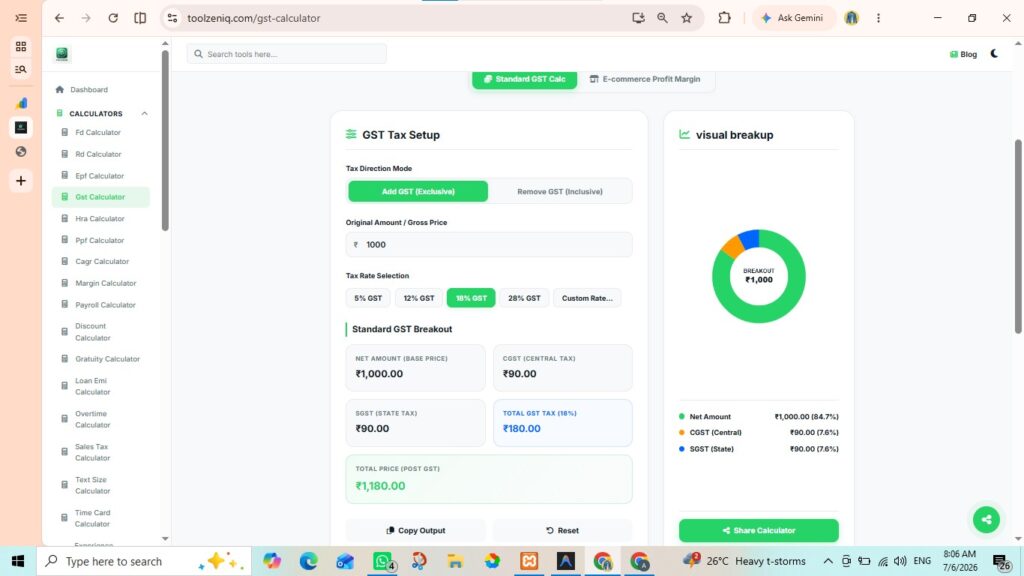
One of the biggest advantages of this calculator is its simplicity. Even if you’ve never calculated GST before, you can use it without any prior accounting knowledge.
First go to – toolzeniq.com
Step 1: Choose Your Calculation Mode
The calculator offers two calculation options.
Add GST (Exclusive)
Select this option when the amount you entered does not include GST.
The calculator will add the selected GST percentage and display the final amount.
Remove GST (Inclusive)
Choose this option if GST has already been included in the total price.
The calculator will automatically calculate the original amount before GST along with the tax portion.
Step 2: Enter the Original Amount
In the Original Amount / Gross Price field, type the amount you want to calculate.
For example:
₹1,000
The calculator accepts any valid amount, whether you’re calculating GST on a small purchase or a high-value business invoice.
Step 3: Select the GST Rate
Next, choose the GST rate applicable to your product or service.
Available options include:
- 5%
- 12%
- 18%
- 28%
- Custom Rate
If your business falls under a different tax percentage, simply use the Custom Rate option.
Step 4: View the Results Instantly
As soon as you select the GST rate, the calculator automatically generates a complete tax summary.
You’ll see:
- Net Amount
- GST Amount
- CGST
- SGST
- Total GST
- Final Price After GST
- Visual Breakdown Chart
There’s no need to click a “Calculate” button. Every value updates automatically as you change the amount or tax rate.
Example: How to Calculate 18% GST on ₹1,000
Let’s look at a practical example.
Suppose you’re selling a product with a base price of ₹1,000, and it falls under the 18% GST category.
The calculation would look like this:
| Description | Amount |
|---|---|
| Original Price | ₹1,000 |
| CGST (9%) | ₹90 |
| SGST (9%) | ₹90 |
| Total GST | ₹180 |
| Final Price | ₹1,180 |
Instead of performing these calculations manually, the Toolzeniq GST Calculator generates the same result instantly.
GST Formula Explained
Although the calculator performs every calculation automatically, understanding the basic GST formulas can be helpful.
Formula for Adding GST
GST Amount = Original Price × GST Rate ÷ 100
Final Price = Original Price + GST Amount
Formula for Removing GST
Original Price = GST Inclusive Price × 100 ÷ (100 + GST Rate)
These formulas work for every GST slab, whether you’re calculating 5%, 12%, 18%, or 28% GST.