Have you ever wondered why some YouTube videos get thousands or even millions of clicks while others struggle to get views? One of the biggest reasons is the YouTube thumbnail. A well-designed thumbnail grabs attention instantly and encourages viewers to click on your video.
However, creating a beautiful thumbnail is only half the job. Using the correct YouTube thumbnail size is equally important. If your thumbnail has the wrong dimensions or resolution, it may appear blurry, stretched, cropped, or lose its visual quality on different devices.
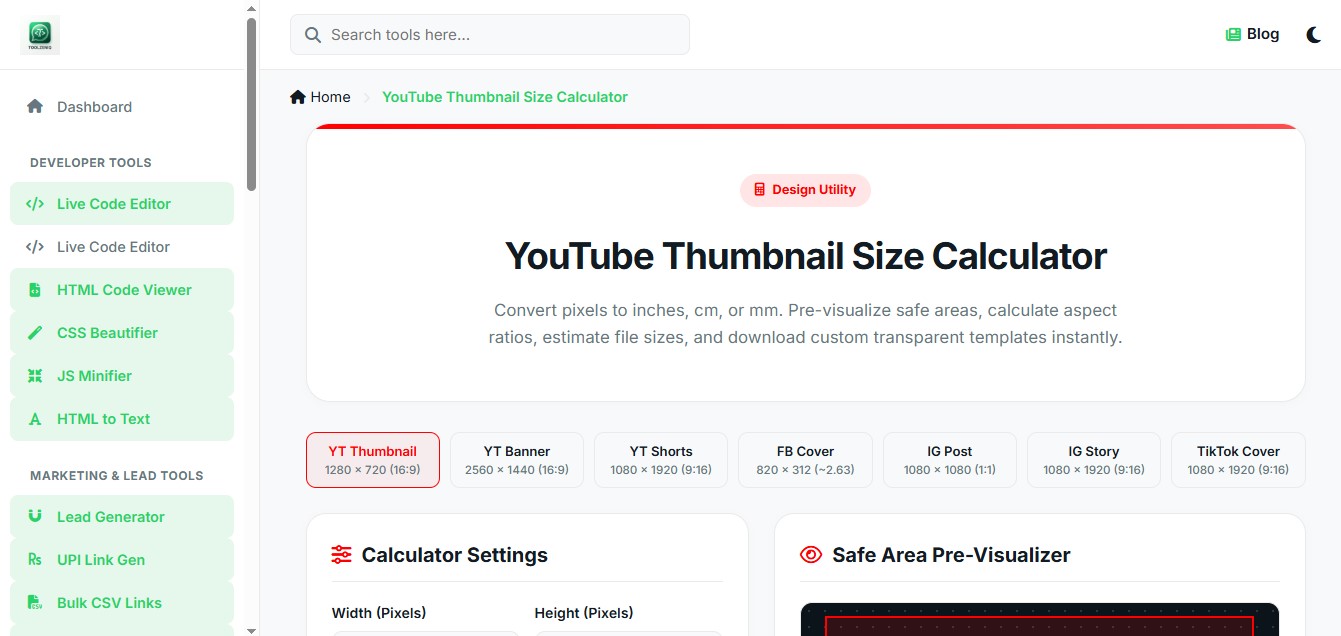
That’s where the Toolzeniq YouTube Thumbnail Size Calculator becomes useful. Instead of manually converting pixels into inches, centimeters, or millimeters, our free calculator gives you accurate results instantly. Whether you’re a beginner, content creator, graphic designer, or YouTube professional, this tool helps you create perfectly sized thumbnails in seconds.
What is the Best YouTube Thumbnail Size?
The officially recommended YouTube thumbnail size is:
- Width: 1280 pixels
- Height: 720 pixels
- Aspect Ratio: 16:9
- Minimum Width: 640 pixels
- Maximum File Size: 2 MB
- Supported Formats: JPG, PNG, GIF, BMP
These dimensions ensure that your thumbnail looks sharp on desktops, tablets, smartphones, smart TVs, and embedded video players.
Although YouTube accepts various image sizes, using the recommended dimensions ensures the highest image quality and prevents unwanted cropping or distortion.
Why is Thumbnail Size Important?
Many creators spend hours designing thumbnails but ignore the recommended size. As a result, their thumbnails become blurry or poorly cropped.
Using the correct thumbnail dimensions provides several benefits:
- Better image quality
- Higher Click-Through Rate (CTR)
- Professional appearance
- Better visibility on all devices
- Improved branding
- Better user experience
Even a small improvement in thumbnail quality can significantly increase video clicks and overall channel performance.
Recommended YouTube Thumbnail Dimensions
The ideal YouTube thumbnail dimensions are:
| Specification | Recommended Value |
|---|---|
| Width | 1280 Pixels |
| Height | 720 Pixels |
| Aspect Ratio | 16:9 |
| Minimum Width | 640 Pixels |
| Maximum File Size | 2 MB |
| Image Format | JPG or PNG |
These dimensions work perfectly for:
- Standard YouTube Videos
- Gaming Videos
- Tutorials
- Educational Videos
- Vlogs
- Tech Reviews
- Product Reviews
- Business Videos
YouTube Thumbnail Resolution Explained
Resolution refers to the total number of pixels that make up your image.
The standard YouTube thumbnail resolution is:
1280 × 720 pixels
Higher resolution means:
- Sharper text
- Better graphics
- Clearer images
- Professional appearance
Low-resolution thumbnails often look pixelated, especially on larger screens such as TVs or high-resolution monitors.
If you’re serious about growing your YouTube channel, always upload thumbnails with the recommended resolution.
YouTube Thumbnail Size in Inches
Many graphic designers and print professionals work in inches rather than pixels. The actual thumbnail size in inches depends on the selected DPI (Dots Per Inch).
Here are some common conversions:
| DPI | Thumbnail Size in Inches |
| 72 DPI | 17.78 × 10 Inches |
| 96 DPI | 13.33 × 7.5 Inches |
| 150 DPI | 8.53 × 4.8 Inches |
| 300 DPI | 4.27 × 2.4 Inches |
Instead of calculating these values manually, simply use the Toolzeniq YouTube Thumbnail Size Calculator to get instant and accurate results.
YouTube Thumbnail Size in CM
If you work with metric units, converting pixels into centimeters can be confusing.
Our calculator instantly converts YouTube thumbnail dimensions into centimeters based on your selected DPI.
This feature is especially useful for:
- Graphic Designers
- Printing Professionals
- Marketing Agencies
- Educational Projects
- Presentation Designers
No manual formulas or complex calculations are required.
YouTube Thumbnail Size in MM
Some professional design software uses millimeters instead of pixels.
The Toolzeniq calculator automatically converts:
- Pixels to Millimeters
- Inches to Millimeters
- Centimeters to Millimeters
This makes designing thumbnails much easier when working with professional editing software.
Best Image Format for YouTube Thumbnails
YouTube supports several image formats, but the two most popular are:
JPG
JPG is the best choice for most YouTube creators because:
- Smaller file size
- Faster upload
- Faster loading
- Good image quality
PNG
PNG is recommended when:
- Your thumbnail contains logos.
- Your design includes transparent elements.
- You want maximum image quality.
- You use detailed graphics or illustrations.
Both formats are fully supported by YouTube, but always keep the file size under 2 MB.
Common Mistakes to Avoid
Many creators accidentally reduce the quality of their thumbnails by making these common mistakes:
- Uploading low-resolution images
- Using the wrong aspect ratio
- Exceeding the 2 MB file size limit
- Adding too much text
- Using blurry background images
- Stretching small images to fit larger dimensions
- Ignoring mobile users
Avoiding these mistakes can improve the appearance of your videos and increase the chances of getting more clicks.
What’s Next?
Now that you understand the correct YouTube thumbnail dimensions, resolution, and measurement units, the next step is learning how to convert pixels into inches, centimeters, and millimeters automatically.
In the next section, we’ll explain how to use the Toolzeniq YouTube Thumbnail Size Calculator, understand DPI, convert pixels into different units, and choose the perfect thumbnail settings for every YouTube video.
How to Use Toolzeniq YouTube Thumbnail Size Calculator
Designing a professional YouTube thumbnail becomes much easier when you know the exact dimensions and measurement units. Instead of manually converting pixels into inches, centimeters, or millimeters, the Toolzeniq YouTube Thumbnail Size Calculator does everything instantly.
Whether you’re a YouTuber, graphic designer, digital marketer, or beginner, this free tool helps you calculate accurate thumbnail dimensions within seconds.
Step 1: Open the Calculator
Visit the Toolzeniq YouTube Thumbnail Size Calculator page from your browser.
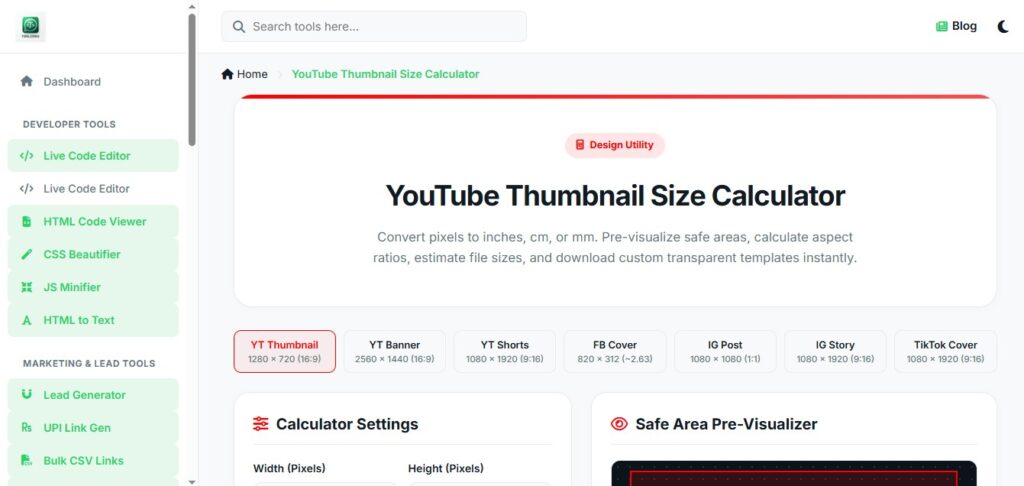
The tool works perfectly on:
- Desktop
- Laptop
- Tablet
- Android Devices
- iPhone
- iPad
No installation or registration is required.
Step 2: Enter Thumbnail Width & Height
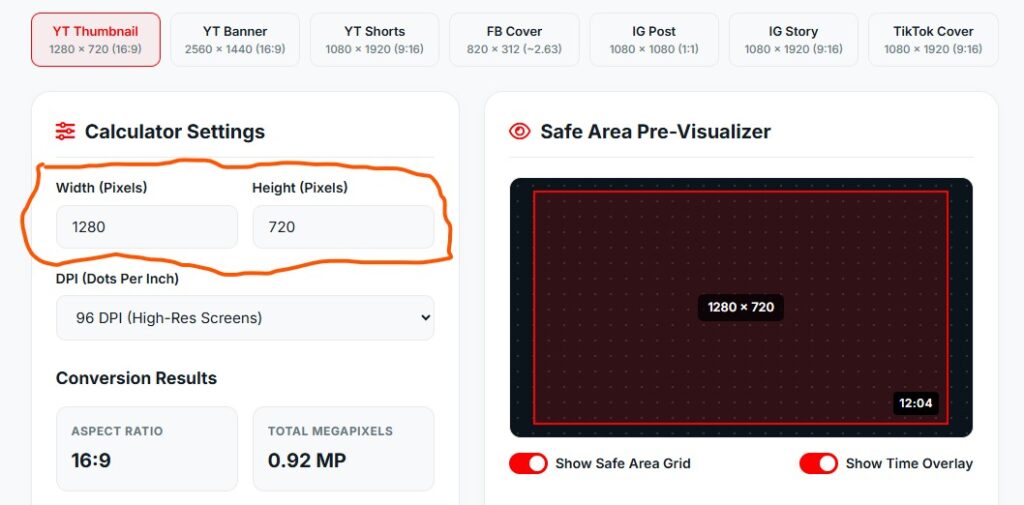
Enter your thumbnail dimensions in pixels.
For example:
- Width: 1280
- Height: 720
You can also enter any custom dimensions if you’re creating thumbnails for different platforms.
Step 3: Select DPI
Choose your preferred DPI value.
Common options include:
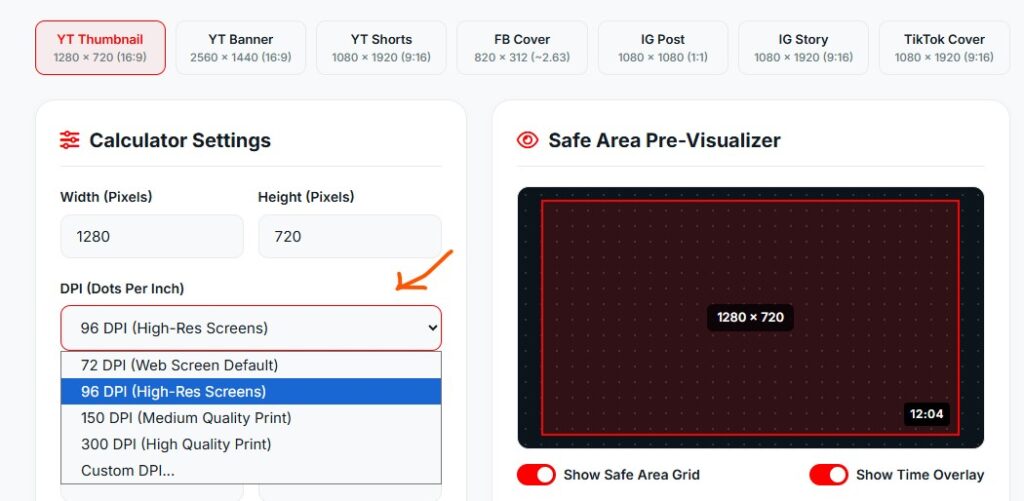
- 72 DPI
- 96 DPI
- 150 DPI
- 300 DPI
- Custom DPI
The calculator will automatically convert your pixel dimensions into physical measurements.
Step 4: Click download png
After entering your values, click the download png button.
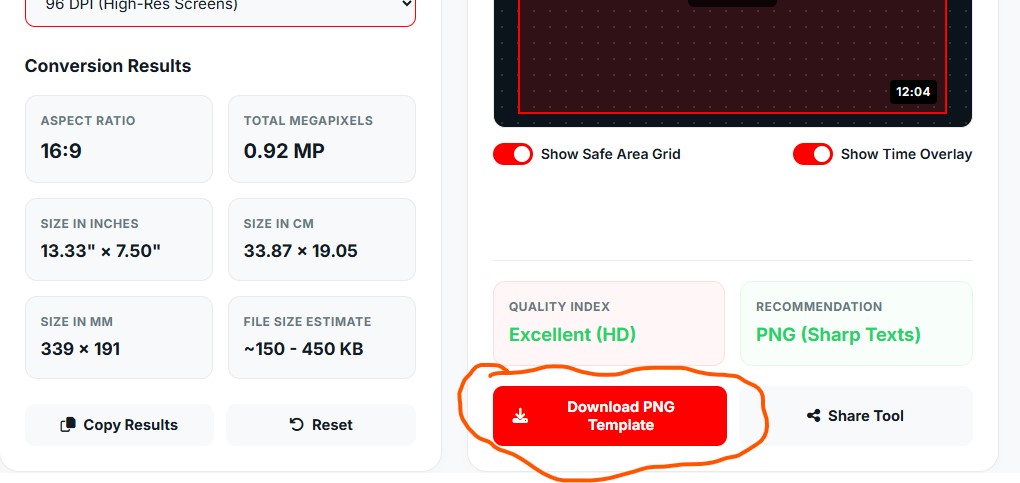
Within a second, the tool displays:
- Width in Inches
- Height in Inches
- Width in Centimeters
- Height in Centimeters
- Width in Millimeters
- Height in Millimeters
- Aspect Ratio
- Estimated Image Size
- Image Quality Recommendation
Everything is calculated automatically without using any formulas.
What is YouTube Thumbnail DPI?
DPI stands for Dots Per Inch.
It defines how many dots or pixels are displayed within one inch when an image is printed or measured physically.
For YouTube thumbnails, DPI does not affect how the image appears online. YouTube displays thumbnails based on pixel dimensions rather than DPI.
However, DPI becomes important when:
- Printing thumbnails
- Converting pixels into inches
- Professional graphic design
- Creating marketing materials
The Toolzeniq calculator supports multiple DPI values, making these conversions accurate and effortless.
Thumbnail Pixels to Inches Converter
Many designers need to convert pixels into inches while working in Photoshop, Illustrator, Canva, or other design software.
Instead of using complicated formulas, Toolzeniq instantly converts:
- Pixels to Inches
- Inches to Pixels
Example conversions:
| Pixels | 72 DPI | 96 DPI | 300 DPI |
|---|---|---|---|
| 1280 px | 17.78 in | 13.33 in | 4.27 in |
| 720 px | 10 in | 7.5 in | 2.4 in |
These values help you maintain consistent sizing across different projects.
YouTube Thumbnail Size Converter
The built-in converter supports multiple measurement units.
You can convert:
- Pixels → Inches
- Pixels → Centimeters
- Pixels → Millimeters
- Inches → Pixels
- Centimeters → Pixels
- Millimeters → Pixels
This eliminates manual calculations and reduces the chance of errors.
YouTube Thumbnail Size in Centimeters
If you’re working with metric units, the calculator instantly converts thumbnail dimensions into centimeters.
This feature is useful for:
- Print designers
- Graphic artists
- Agencies
- Students
- Marketing professionals
With just one click, you receive accurate centimeter measurements based on your selected DPI.
Thumbnail Size in Millimeters
Some professional printing workflows require measurements in millimeters.
Toolzeniq automatically converts your thumbnail dimensions into millimeters, making it easier to work with precision-based design software.
No extra calculations are needed.
YouTube Shorts Thumbnail Size
Many creators ask whether YouTube Shorts have a separate thumbnail size.
Technically, YouTube Shorts do not use a unique thumbnail dimension. However, if you’re creating custom artwork for Shorts, it’s recommended to design in a 9:16 vertical format (such as 1080 × 1920 pixels) to match the viewing experience on mobile devices.
If your Short also appears in other sections of YouTube, using high-quality artwork ensures a more professional look.
YouTube Banner Size vs Thumbnail Size
Many beginners confuse YouTube banners with thumbnails, but they serve different purposes.
| Feature | Thumbnail | Banner |
|---|---|---|
| Purpose | Video Cover Image | Channel Cover Image |
| Recommended Size | 1280 × 720 px | 2560 × 1440 px |
| Aspect Ratio | 16:9 | 16:9 (with safe area) |
| Maximum File Size | 2 MB | 6 MB |
Always use the correct dimensions for each element to maintain a professional-looking channel.
Why Use Toolzeniq Instead of Manual Calculations?
Manual conversions take time and often lead to mistakes.
Toolzeniq provides several advantages:
- Instant calculations
- Accurate conversions
- Multiple measurement units
- DPI support
- Mobile-friendly interface
- No registration required
- Completely free to use
- Fast loading
- Easy for beginners
- Professional-grade results
Whether you’re creating one thumbnail or hundreds, Toolzeniq saves time and improves accuracy.
Pro Tips for Better YouTube Thumbnails
To maximize clicks and improve your video’s performance:
- Use high-resolution images.
- Keep important text large and readable.
- Maintain the 16:9 aspect ratio.
- Avoid overcrowding the design.
- Use contrasting colors.
- Keep file size below 2 MB.
- Test thumbnails on both desktop and mobile.
- Export in JPG or PNG for the best balance of quality and compatibility.
Following these practices can help increase your video’s Click-Through Rate (CTR) and make your content stand out.
Coming Up Next
In the final section, we’ll answer the most frequently asked questions about YouTube thumbnail sizes, provide expert tips, compare JPG vs PNG, discuss common mistakes, and explain why Toolzeniq is one of the easiest ways to calculate thumbnail dimensions accurately.
1. What is the best YouTube thumbnail size?
The recommended YouTube thumbnail size is 1280 × 720 pixels with a 16:9 aspect ratio. This size provides excellent image quality across desktops, mobile devices, tablets, and smart TVs.
2. What is the minimum YouTube thumbnail width?
The minimum recommended width is 640 pixels. However, using 1280 × 720 pixels is highly recommended for the best results.
3. What is the best YouTube thumbnail resolution?
The ideal resolution is 1280 × 720 pixels. High-resolution thumbnails appear sharper and more professional.
4. What aspect ratio should a YouTube thumbnail have?
The recommended aspect ratio is 16:9, which fits perfectly across all YouTube devices.
5. What is YouTube thumbnail size in inches?
The size in inches depends on the selected DPI. For example, at 300 DPI, a 1280 × 720 px thumbnail measures approximately 4.27 × 2.40 inches. You can use the Toolzeniq YouTube Thumbnail Size Calculator to convert pixels into inches instantly.
6. What is YouTube thumbnail size in CM?
The dimensions in centimeters vary based on the DPI value. Toolzeniq automatically converts pixels into centimeters without requiring manual calculations.
7. What is the best DPI for YouTube thumbnails?
Since YouTube displays images digitally, 72 DPI is generally sufficient. However, if you need measurements for printing or design work, 150 DPI or 300 DPI may be more appropriate.
8. Can I upload PNG thumbnails?
Yes. YouTube supports PNG, JPG, GIF, and BMP image formats. PNG is a good choice for graphics and text because it preserves image quality.
9. Which is better: JPG or PNG?
- JPG: Smaller file size and faster uploads.
- PNG: Better image quality and supports transparency.
Both formats are supported by YouTube.
10. What is the maximum thumbnail file size?
The maximum allowed file size is 2 MB.
11. Can I use 1920 × 1080 as a YouTube thumbnail?
Yes, but YouTube recommends 1280 × 720 pixels. Larger images are accepted, but they should maintain the 16:9 aspect ratio and stay within the file size limit.
12. Can I change my thumbnail after uploading a video?
Yes. You can update your custom thumbnail at any time using YouTube Studio.
13. Does the Toolzeniq calculator work on mobile?
Yes. The calculator is fully responsive and works smoothly on smartphones, tablets, laptops, and desktop computers
14. Is Toolzeniq YouTube Thumbnail Size Calculator free?
Absolutely. The calculator is completely free to use with no registration or subscription required.
15. Can I convert pixels into inches and centimeters?
Yes. Toolzeniq instantly converts:
- Pixels to Inches
- Pixels to Centimeters
- Pixels to Millimeters
based on your selected DPI.
Why Choose Toolzeniq YouTube Thumbnail Size Calculator?
Thousands of creators waste time manually calculating thumbnail dimensions. Toolzeniq simplifies the entire process by providing instant, accurate, and reliable conversions.
Key Benefits
- 100% Free Online Tool
- No Sign-Up Required
- Instant Pixel Conversion
- Supports DPI Calculations
- Converts Pixels to Inches, CM & MM
- Mobile-Friendly Design
- Fast Loading
- Accurate Results
- Beginner-Friendly Interface
- Professional Design Support
Whether you’re a YouTuber, designer, marketer, or student, Toolzeniq helps you create thumbnails with confidence.
Final Thoughts
Creating a great YouTube thumbnail is not just about using attractive colors or bold text—it also requires the correct dimensions, resolution, and file format. A thumbnail that follows YouTube’s recommended size guidelines looks sharper, loads correctly on every device, and can improve your video’s click-through rate.
Instead of spending time calculating measurements manually, the Toolzeniq YouTube Thumbnail Size Calculator gives you everything you need in one place. Whether you want to convert pixels into inches, centimeters, or millimeters, check the aspect ratio, estimate file size, or choose the best image format, the calculator delivers fast and accurate results.
If you’re serious about growing your YouTube channel, using the right thumbnail size is one of the simplest ways to create a professional first impression. Try the free Toolzeniq YouTube Thumbnail Size Calculator today and design thumbnails with confidence.
Continue Exploring Toolzeniq
Toolzeniq offers a growing collection of free online tools for creators, developers, students, businesses, and marketers. From image converters and calculators to QR code generators and productivity tools, our goal is to make everyday tasks faster and easier.
Bookmark Toolzeniq and explore our latest free tools to simplify your workflow and improve your digital projects.